Thursday

How to select a computer motherboard

What is a computer motherboard or a ‘mobo’ anyway? It is the primary circuit board of your computer. It effectively means that it is one of the most important part amongst all the other devices present in your computer. And combined with the CPU (Central processing unit), it is the costliest as well.

So, if you are planning to get a computer assembled and would like to choose each device, how does the motherboard part come into it? That’s because all other parts depend on the motherboard for operation and compatibility with the motherboard is a must for the sound operation of your computer.
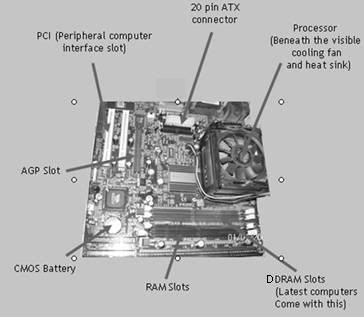
Before we get to selecting a motherboard, let’s get to know it a bit. A computer motherboard broadly consists of the following parts:
1. Processor: This is the part where the computer does its calculations. It is generally hidden behind the heat sink and the cooling fan.

2. Main memory: This is added to the computer motherboard in the slots available (DDRAM slots in the picture).

3. Other Components:·
ATX (Advanced Technology Extended) connector or, rather, the power plug-in for the motherboard·
PCI Slots – These slots are available for adding various components to the motherboard, such as sound cards, Ethernet Card (for LAN), etc·
AGP(Advanced Graphics Port) – For video adapters·
BIOS (Basic Input and Output) – The part responsible for initializing the vital components of the computer when it is turned on – (CMOS battery responsible for the BIOS is shown in the figure.)

Now let’s get to the question of actually selecting a computer motherboard. What features do you want in it?

1. Which processor are you planning to use with it – Check with your vendor whether the motherboard is compatible with the type of processor you want to use with it.

2. FSB (Front Side Bus) or Bus Speed – Check the FSB of the computer. It is the speed at which your computer communicates with the processor as well as with the PCI and the hard drives, although at a slower pace. If the speed of your hard disk is higher than the bus speed, you run the risk of underutilizing your hard disk.

3. Type of chipset – Check the type of motherboard chipset as the motherboard is basically dependent on it for almost all operations.

4. Memory Support – Which type of memory you need – SDRAM, DDRAM or DDR2. Most of the modern motherboards come with a DDR compatibility as it is cheaper and faster.However, check for the number of slots provided, so that you can upgrade the memory later.

5. Does it have an AGP Slot? (Find the AGP in the picture show at the end.) - This is necessary if you plan to use a video card for enhanced graphics performance.

6. How many PCI slots does it have? More number of PCI slots means more flexibility to add components such as sound cards, Ethernet cards etc. Go for a motherboard which has at least three slots.

7. Does it have an inbuilt sound or graphics card? – That means lesser driver conflicts and hence, better performance at lower cost if you are not the game-crazy type.Remember that choosing the motherboard determines the possibilities of up-gradation later. So keep that in mind.

Tuesday

Computer Power Supply Unit (SMPS)

SMPS - Switch Mode Power Supply - is the technical term for what we generally know as the computer power supply unit. It is basically a box-like device used for the supply of power to your computer unit. So what does it do? In very simple terms, it converts the AC (Alternating Current) power supply from the general electrical sockets available at your home to DC (Direct Current), basically the type of current you get from a battery. The "Switch" term in the SMPS comes from the fact that the computer power supply unit converts AC to DC using switcher technology. We now use the ATX supply power units for the computers as the industry has settled on a standardized case and motherboard (ATX).

Typically, three voltages (12V, 3.3V and 5V) are supplied by the power supply unit.

If you are selecting a computer power supply unit, how do you go about doing that?

1. The first thing of course is to know what power requirements you are looking at. You can check the power requirements of the various devices of your computer and add them up, or you can just ask the vendor for the same. Once you have the total wattage, (that will be the unit of power), you can go for a slightly higher rated SMPS.
Now why you want to do that is because, at a later point of time, if you want to upgrade your computer, like a new DVD RAM drive, you may need a higher power supply.
One more thing to remember is to check the actual wattage against what the label on the power supply unit indicates.

2. It is always a good idea to go for a branded power supply unit. But that might not help if price is an important criteria.
The SMPS supplies power to all the components of the computer, like the motherboard (24/20 pins), hard drives and CD ROMS etc (IDE 4-pin), floppy drives (Floppy 4-pin), etc.
What happens is that, once the computer is powered on, there is a surge of current and as a result, it gets heated up. The fan, in such a condition is crucial, other wise, high temperatures might result. You should have at least one 80mm fan. It is even better if there are two fans instead of one.
(One such problem is the continuous restart of your computer as the temperature rise due to a faulty power supply causes the computer to shut down without giving any error message, and in some cases, not even the BIOS screen.)

If you have a branded SMPS, you can rest assured that there is not much chance of such an event occurring.

3. Number of connectors and the efficiency rating – These two factors are at par with the other factors while considering the computer power supply unit. The efficiency rating, is important as it is directly related to the heat output and subsequent temperature rise. Higher efficiency rating ensures that the SMPS causes a lesser rise in temperature.
The number of connectors is important as it determines how many devices you can use with your computer.

4. Lastly, the noise level – Apart from the CPU fan, the SMPS fan also determines the amount of noise generated – Except from a fine whirring sound, which is basically indistinguishable, you should not have any other sound coming from the SMPS.

Friday

An Inexpensive Latest Christmas Gift Idea

Every Christmas gift brings with it happiness, cheer, joy & festivities. It also brings stress. According to popular surveys, Christmas shopping is one of the most stressful times of the year for a lot of people around the world. Often, people run out of ideas as to what to buy for their near and dear ones.

This year, too, it's going to be the same. In fact, it is going to be worse. With the economic slowdown hitting every one of us in one way or the other, everyone is hard pressed and worried about their Christmas shopping. As per reports, people have decided to cut down their Christmas shopping budget by 15-20%.

So what can we buy this Christmas that is not very expensive and yet conveys our love and care? One of the answers is a customized bobblehead doll. This latest Christmas gift idea is already selling like hotcakes. There is nothing like giving a personal touch to your gift and its even better when it doesn't pinch the pocket much.

A bobblehead doll which uses the image of your choice and you can also inscribe a message of your choice, can go a long way as a Christmas gift that is so different from others. This latest Christmas gift idea will also ensure that your gift is unique. The shipping time is less than ten days and you have the added convenience of the gifts being delivered at your doorstep. The Santa bobblehead doll can be a great Christmas gift basket idea for the kids. Since a bobblehead doll is placed in a car or a living room or at a desk, it also stays fresh in the person's memory.

So latch on to this latest Christmas gift idea, which is unique, personal and inexpensive. It is sure to make you popular this Christmas.
Bobbleheads are NO LONGER exclusive to celebrities Now you may order yours! 
 
Visit http://www.custombobble.com
Article Source: http://EzineArticles.com/?expert=Daniel_V_Lee

Create a Gift Memory Book By Jeff McRitchie

A memory book is a great gift to help celebrate a birthday or other momentous occasion. Here are a few tips and ideas to help get you started.

Gather Your Material:

For your memory book, the first thing you are going to want to do is to enlist the help of as many friends and family of the guest of honor (GOH) as you can. Get an email list together and send a list of questions out to all of them, or ask for great stories that involve the GOH. Some examples of questions might be: tell us about how you met the GOH, what is the funniest thing he or she ever said or did, how he or she helped you through a rough time, etc. The idea is to get as many different anecdotes as possible, and if there is one great story, get some different perspectives on it. If the GOH has children, see of you can get them to do a drawing or write a poem.

The key here is to not be to rigid in what you expect from your contributors. Those who have a natural bent for writing should given free reign to contribute whatever they would like to, whereas those who busy or are hard to pin down can just give short answers to specific questions.

You should also ask for some great photographs from the past and present. You may have to encourage some people to scan photos that are not already in a digital format, or to send them to you via snail mail.

Putting it Together:

There are a few different ways you can go about this. You can either put the stories and pictures in chronological order of the GOH's life, or you can let each contributor have his or her own page, or you can divide the book into sections that were contributed by friends, family, children, etc.

When you are designing your pages, it might be a good idea to include clip art of the GOH's favorite hobbies, or items that are representative of what the story on that particular page is. If, for instance, someone is telling a story about a fishing trip, you can include clip art or images of fishing flies and rods, etc.

When you are putting your memory book together, keep fun in mind. Your GOH is going to be totally surprised, so depending on his or her personality, you may not want to do anything too embarrassing or tear-jerkingly poignant. Then again, you might. It all depends on the person. Just keep in mind that the book you are creating is something that you want the GOH to keep forever.

Printing and Binding:

When it comes to printing, you will probably want to make the pages as high quality as possible, so use a digital color printer if possible. There are lots of options for binding the book. "You can take it to the print and copy shop, send it away to one of many online services, or for less than one hundred dollars you can get a machine that will allow you to bind the book yourself. Thermal (hardcover) binding machines are really easy to use, and allow you to make as many copies as you want at a moment's notice. They are great to have around for other projects too, as well as repairing your old and worn out books.

If you are interested in more information about how the right Thermal Binding Systems can help you create a great memory book you might want to visit MyBinding.com. They offer a great price on these machines and they even offer Free Shipping on orders over$75. Plus, they carry a full line of Thermal Binding Supplies, in many colors and sizes.

If you are looking for other information and articles to help you learn about Binding and Laminating, you should really check out MyBindingBlog.com. They feature thousands of articles, posts and product reviews on topics related to binding, laminating, paper shredding and paper handling. Check them out today.

Monday

Goals and strategies of psychotherapy.

The goal of therapy has been put in terms of removing symptoms, restoring earlier levels of functioning, freeing the person to be self realizing( in Roger’s term, “a  fully functioning person” and according to Gita, becoming a “sthita prajna personality”), helping the person find personal meaning and values or restructuring defenses and character. The behavioral transformation is the main concern of both eastern and the western therapists. The dissimilarity we may find in the approach to look at the problems. Mind in western therapy is considered as a clinical entity whereas in yoga it is used as a tool to actualize one’s essential state of being. In both systems of yoga and psychotherapy the following may be instrumental for a change or transformation of personality:
1. Insight: To increase awareness and understanding of how and why we act as we do is fundamental to many therapeutic approaches like Psychoanalysis, Analytical psychology, Gestaltism, Existentialism etc. In yoga therapy different tools are used to expand the range of awareness. Developing self understanding and knowledge is what aspired in yoga.
  1. Correcting emotional experiences: There are different approaches to deal with the emotional experiences of the individual. To relive the traumatic experiences and to give a safe vent to the feelings are important features of the psychotherapeutic process.
  2. Reeducation: In both yoga and psychotherapy reeducation is emphasized. It is accomplished by replacing an infantile, pathologic or maladaptive attitude by more mature and healthier ones.
  3. Growth: Successful therapy removes the obstacles to growth and permits the process of self actualization to continue.

Read more: http://www.articlesbase.com/yoga-articles/yoga-therapy-in-the-light-of-contemporary-psychotherapies-1251493.html

Friday

Use Eco Friendly Practices in Promotional Items


Promotions are a good way of marketing a business, but in many cases, the promotional marketing items in the giveaways are usually wasteful and harmful to the environment. Protecting the environment when choosing promotional items can be a great way of achieving even greater publicity and attaining clients.

First, choose products that are have practical, reusable qualities as promotional gifts during giveaways. A logo branded sports bottle made of stainless steel is a good example because it is hygienic and reusable, such that the users can reduce the amount of plastics thrown out in the form of plastic water bottle. Giving promotional logo items like pens, travel mugs and such reusable items is also an eco-friendly practice.

Secondly, make sure that all stationery items in the promotion are made from recycled materials. Notebooks, portfolios and business card holders make great free gifts, so ensuring that they are all made from recycled paper and still good quality is a good practice. Keep in mind that many of these products are well designed to add to their appeal which is another feature that can attract customers to your business through promotional items.

Thirdly when holding events, it is always best to use environmental friendly cutlery.This can work for relatively small scale events since all you have to do is purchase one batch of these cutlery sets for use in every event the business has. At the end of the event, the knives, forks and spoons can be collected, cleaned and stored in a sanitary manner for use next time. This cuts down on the use of disposable plastic eating utensils and you can save money in the long term.

Finally, sporting events also require promotional items like caps and t-shirts made from recycled materials. There are also promotional golf balls which are recyclable and printed with your company logo for tournaments. Do your best to look for safe, environmentally friendly alternatives to items used in sports and other sponsored events to save money and the environment.

Article Source: http://EzineArticles.com/5852097


What experts don’t want you to know about UPS’s (uninterruptible power supplies)

On-line UPS’s use power to charge the battery and then operate the inverter.

This power is paid for by you the user of the UPS.

This power, used by the UPS to protect and support your computer and equipment is between 5 and 20 % of the power used.

A line interactive UPS uses less power, because the inverter does not operate unless there is a power failure.

A line interactive UPS is generally cheaper than an on-line unit in price and in running costs.

A line interactive UPS is generally smaller than an on-line UPS,

An on-line UPS has a more stable output than a line interactive unit.

Most modern on-line UPS’s do not have isolation between the input power and the output power.

If the input is not isolated from the output, the equipment connected to a UPS can be affected by noise and distortion of the neutral line.

Most equipment including PC’s do not require a sinusoidal (sine) waveform as the power supply converts the waveform to DC (direct current).

Batteries are an essential part of any UPS system and should be replaced every 3 to 5 years (depending on supply conditions, this could even be sooner) unless the batteries are rated at a higher life expectancy.

Sometimes it will cost 60% of a small UPS’s cost to replace the battery, but this could still be worth doing due to the higher specification of the replacement battery.